~Get ready to feel the beat!~
MMD OGB is an VRChat Avatar gimmick that allows VRC worlds to control your OSCGoesBrr linked devices. Worlds can control devices directly via animations, code, or AudioLink. Up to four devices can be controlled individually.
Additionally, you can combine this with OSCAudioLink to control your devices via AudioLink, regardless of world support!
Works In:
MMD Night
Nero’s MMD World
(If you are a world creator and would like your world to be listed here, please let me know)
Features:
Includes VRCFury Prefab: https://vrcfury.com/
Includes Modular Avatar Prefab: https://modular-avatar.nadena.dev/
Performance Notes:
+ 5 VRC Contact Receivers (Local Only)
+ 5 VRC Contact Senders (Local Only)
+ 5 Parameters (Local Only)
Prefab Installation Instructions
- Import the MMDOBG Unity Package.
- In the Hierarchy Window, go to the Assets/MMD_OGB folder.
- Select Prefab from either ModularAvatar folder or VRCFury folder.
- Drag Prefab on to your Avatar.
a) Please ensure prefab is on root level of your avatar (same as Armature and Body) - Upload your Avatar.
OSC Setup
0. Install OscGoesBrr
https://osc.toys/getting-started
1. Setup your VRChat Avatar
instructions
2. Configure OscGoesBrr
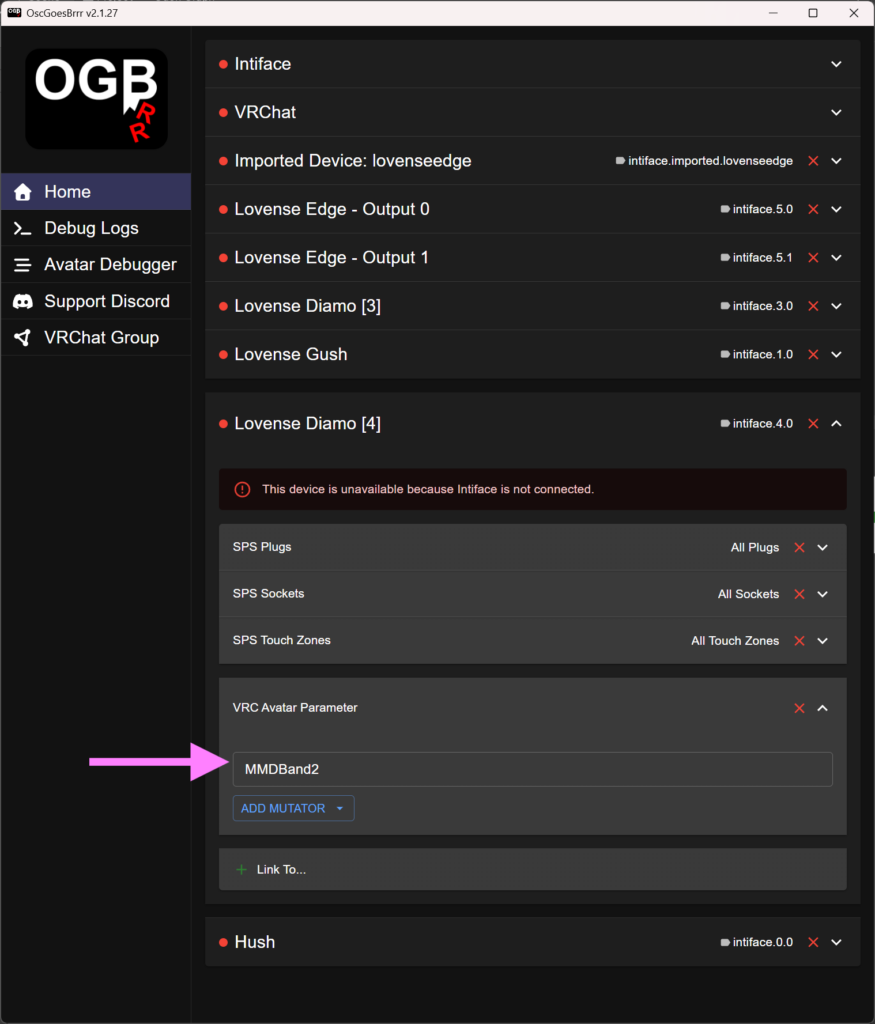
Add the appropriate VRC Avatar Parameter to your desired device.
- Open OscGoesBrr
- Click on your desired device in the list of devices.
- Click on the [+ Link To…] button and select [VRC Avatar Parameter]
- Click on [Unset] and a Parameter Name element box should appear.
- Type in your desired VRC Avatar Parameter from the list provided below.
:: VRC Avatar Parameters ::
MMDBand0 for Red AL Band (Bass)
MMDBand1 for Yellow AL Band (Mids)
MMDBand2 for Green AL Band (Treble)
MMDBand3 for Blue AL Band (High Hat)
You’re all set!
Join a MMD OGB compatible world to test it out! c: